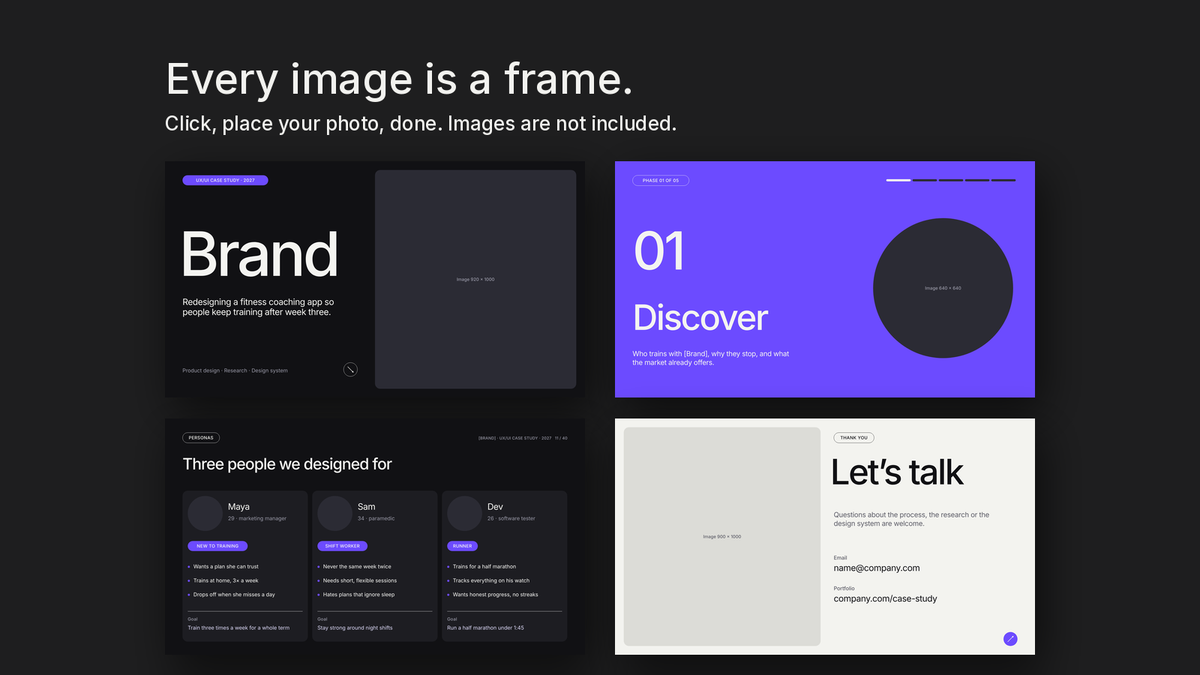
A 40-page UX/UI case study in Module 8 Style 2: rounded cards, one bold accent, and every phone screen, flow, journey map and chart drawn as editable shapes. PowerPoint, Google Slides, Canva, Keynote, InDesign, Illustrator and Figma.
PowerPoint
Google Slides
Canva
Keynote
InDesign
Illustrator
Figma
PDF
Couldn't load pickup availability
Payment methods
🔒 Secure Checkout
A 40-page UX/UI case study in Module 8 Style 2: rounded cards, pill labels and one bold accent.
Show how you think, not just what you shipped. UX/UI Case Study Vol 2 takes the reader from the problem to measured results in five phases, each opened by its own divider.
Why you will love it
The process reviewers look for — Discover, Define, Design, Test and Outcomes, each with its own opener and a five-step progress bar.
Research pages done properly — A research plan, interview insights, personas, a journey map with feelings, a competitive audit and key insights.
Screens without screenshots — Three phone screens, a watch screen, wireframes, an information architecture and a user flow, all drawn as editable shapes.
A design system in three pages — Colour, type and components with states, ready for your own tokens.
Results that convince — Task success, satisfaction, a retention curve, before and after, and outcomes in clear numbers.
One system, 40 layouts — A 12-column grid, 24 px rounded corners, pill labels and two weights of Inter keep every page consistent, and no two layouts are the same.
Works where you work — PowerPoint, Google Slides, Canva, Keynote, InDesign, Illustrator and Figma, plus a PDF preview of every page.
What is included
40 pages, 1920 × 1080 px (16:9)
PowerPoint .pptx (also opens in Google Slides, Keynote and Canva) with one layout per page and rounded picture placeholders
Canva folder with the .pptx and a one-page guide to open it in Canva (free account)
InDesign .idml with a 12-column master page, paragraph styles and named swatches
Illustrator .ai with 40 artboards and grid guides
Figma .fig with 40 frames, layout grids, colour and text styles
SVG of every page, plus an all-in-one SVG
PDF preview of all 40 pages
12-page User Guide (PDF) and licence (PDF)
What is not included
Photos, logos, mockups and data. The fictional product, people and figures shown in the previews are for presentation only; every image area in the files is an empty rounded frame, and every text is a placeholder.
File formats and minimum versions
PowerPoint 2016 or later · Google Slides · Canva (browser) · Keynote 12 or later
Adobe InDesign 2020 or later (IDML)
Adobe Illustrator 2020 or later (.ai, PDF-compatible)
Figma (desktop or browser)
Font: Inter Regular and Medium (free, SIL Open Font License; built into Canva and Google Slides) — download link in the User Guide
Licence
Standard — $29: one brand — your own or one client's.
Extended — $49: unlimited brands.
Commercial — $79: unlimited brands, plus handing editable source files to your client and using exported pages in paid content.
Never resell or share the template files themselves. Full terms in LICENSE.pdf.